MT4 TRADING TOOLS • ORDER MANAGEMENT TERMINAL MT4 TRADING TOOLS • ORDER MANAGEMENT TERMINAL

จัดการออเดอร์บน MT4 ได้ง่ายขึ้น ด้วย FXL-iTerm v1.0 Take control of your MT4 orders with FXL-iTerm v1.0

FXLife iTerm (intelligence Terminal) เป็นเครื่องมือช่วยจัดการออเดอร์บน MT4 สำหรับเทรดเดอร์ที่มีหลายออเดอร์ในพอร์ต ต้องการควบคุมและติดตามกำไร–ขาดทุนได้ชัดเจน ลดความสับสน ไม่ใช่ “EA ออโต้รัน” แต่เป็น Trading Tools ที่ช่วยให้คุณสั่งการได้เร็วและเป็นระบบมากขึ้น FXLife iTerm (Intelligence Terminal) is an MT4 order-management tool designed for traders who run many positions in one account. It helps you monitor profit & loss clearly, reduce confusion and manage the whole portfolio in one panel. It is not an auto-trading EA, but a Trading Tool that lets you control orders faster and more systematically.
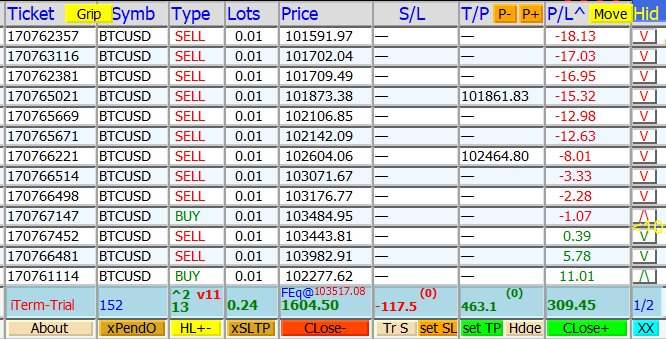
แสดง P/L แบบ Realtime + แยกสีตามประเภทออเดอร์ Realtime P/L with color-coded order types
ควบคุมออเดอร์ทั้งพอร์ตด้วยปุ่มเดียว Control the whole portfolio with one-click actions
รองรับพอร์ตที่มีออเดอร์จำนวนมาก Optimized for accounts with many open orders
ระบบ FXL OTP & FXL Key จัดการ License FXL OTP & FXL Key license management system
⚡ ฟรีโหมดทดลองใช้ | ขอ FXL OTP เพื่อขยายเวลาทดสอบจาก 10 นาทีเป็น 60 นาทีได้ ⚡ Free trial mode | Request an FXL OTP to extend each test run from 10 minutes to 60 minutes.
เหมาะสำหรับ: Best for: เทรดเดอร์ที่ใช้ MT4 เป็นประจำ ต้องจัดการหลายออเดอร์พร้อมกัน Active MT4 traders who manage many open positions at the same time.
ไม่เหมาะสำหรับ: คนที่มองหา EA ออโต้รัน 100% แบบไม่ต้องควบคุมเอง Not for: Traders who only want a 100% auto-trading EA with no manual control.
ตัวอย่างหน้าจอ FXL-iTerm Sample FXL-iTerm screen
MT4 Terminal View MT4 Terminal View
FXL-iTerm UI
จำนวนออเดอร์ในพอร์ต Number of open orders
13 orders
กำไรรวม (P/L รวม) Total portfolio P/L
+ 309.45 USD
ออเดอร์จากมือ (Manual) Manual orders
13 orders
ออเดอร์จาก EA ในพอร์ต Orders from other EAs
0 orders
โหมดตอนนี้ Current mode
Monitor & Manage (Semi-Manual) Monitor & Manage (Semi-Manual)
*ภาพหน้าจอนี้ใช้เพื่อสาธิต UI เท่านั้น ตัวเลขกำไร/ขาดทุนเป็นตัวอย่าง ไม่ใช่ผลการเทรดจริง *Screenshot for demonstration only. P/L values are examples, not real trading results.

ฟีเจอร์หลักของ FXLife iTerm v1.0 Core Features of FXLife iTerm v1.0

ออกแบบจากมุมมองของเทรดเดอร์จริง ช่วยให้การจัดการออเดอร์หลาย ๆ ไม้บน MT4 เป็นเรื่องง่ายและเป็นระบบ Designed from a real trader’s perspective, so managing many MT4 orders becomes easier, clearer and more systematic.

1. ตาราง P/L แบบ Realtime + แยกสี 1. Realtime, color-coded P/L table

เห็นภาพกำไร–ขาดทุนชัดในจอเดียว See your portfolio P/L clearly in a single view

แสดงกำไร/ขาดทุนแบบ Realtime ตามสไตล์ Terminal ของ MT4 แต่เพิ่ม “โค้ดสี” เพื่อแยกประเภทออเดอร์ เช่น ออเดอร์มือกำไร, มือขาดทุน, EA กำไร, EA ขาดทุน และออเดอร์เท่าทุน ทำให้คุณไม่หลงออเดอร์เวลาเปิดหลายไม้พร้อมกัน Shows realtime profit and loss like the standard MT4 terminal, but adds clear color codes for different order types: manual profit, manual loss, EA profit, EA loss and breakeven. You won’t lose track even when you have many open positions.

โค้ดสีตัวเลข P/L (ตัวอย่าง) Sample P/L color codes
Manual กำไร (P/L > 0) Manual profit (P/L > 0)
Manual ขาดทุน (P/L < 0) Manual loss (P/L < 0)
EA อื่นเปิด & กำไร Other EA orders (profit)
EA อื่นเปิด & ขาดทุน Other EA orders (loss)
เท่าทุน (P/L = 0) Breakeven (P/L = 0)

2. เส้น HLine 3 เส้น สำหรับช่วยตัดสินใจ 2. Three HLines for decision support

Pink / White / Blue Line Pink / White / Blue lines

iTerm ใช้เส้นแนวนอนหลัก 3 เส้นบนกราฟ เพื่อช่วยตั้ง TP/SL และจำลองสถานการณ์พอร์ต เช่น ใช้เส้น White Line เป็น “ราคาสมมติในอนาคต” เพื่อประเมินว่า ถ้าราคาไปถึงจุดนั้น Equity จะเหลือเท่าไหร่ พอร์ตยังรับแรงได้ไหม ฯลฯ iTerm provides three key horizontal lines on the chart to help set TP/SL and simulate future scenarios. For example, you can treat the White Line as a “what-if” future price and instantly see how much equity you would have if the market reaches that level.

3. ปุ่มควบคุมบนหัวตาราง 3. Header controls on the table

Grip / Page / Move / Hide Grip / Page / Move / Hide

ย้ายตำแหน่งตารางบนกราฟ, เลื่อนดูออเดอร์หน้าเก่า–หน้าใหม่, ย่อ/ขยายจำนวนแถวที่แสดงต่อหน้า และซ่อน/โชว์ตารางหรือเส้น HLine ชั่วคราว เพื่อให้คุณเห็นกราฟได้เต็มตาเวลาต้องวิเคราะห์ราคา Move the panel anywhere on the chart, switch between order pages, change how many rows are visible and quickly hide/show the table or HLines so you can focus on pure price action when needed.

4. ปุ่มจัดการออเดอร์แบบคลิกเดียว 4. One-click order management

Bottom Button Row Bottom button row

  • ลบ Pending Orders ทั้งหมด (xPendO) Delete all pending orders (xPendO)
  • ลบ SL / TP ทั้งพอร์ต หรือตามเงื่อนไข (xSLTP) Remove SL/TP in bulk with conditions (xSLTP)
  • ปิดเฉพาะออเดอร์ขาดทุน หรือปิดเฉพาะกำไร (Close- / Close+) Close only losing or only winning orders (Close- / Close+)
  • ปิดทุกออเดอร์ในคู่เงินนี้ หรือทั้งพอร์ต (XX) Close all orders on this symbol or entire account (XX)

5. เครื่องมือจัดการ SL / TP & Trail 5. SL / TP & trailing tools

TrS, Set SL, Set TP TrS, Set SL, Set TP

ตั้ง SL/TP ทีเดียวหลายไม้จากตำแหน่ง HLine, ใช้โหมด Trial Stop (TrS) เพื่อล็อกกำไรเมื่อราคาเดินหน้า และเลือกทำงานเฉพาะออเดอร์กำไรหรือขาดทุนตามที่คุณต้องการ Set SL/TP for many orders at once from HLine levels, use the TrS mode as a trailing-style lock when the market moves in your favor, and apply actions only to profitable or losing orders—your choice.

6. ระบบ License & Trial ที่ยืดหยุ่น 6. Flexible license & trial system

FXL OTP & FXL Key FXL OTP & FXL Key

ใส่ Email เพื่อขอ FXL OTP ขยายเวลาทดลองจาก 10 นาทีเป็น 60 นาทีต่อครั้ง และใช้ FXL Key สำหรับโหมดสมาชิกแบบ 3 เดือน, 6 เดือน, 1 ปี หรือ LifeTime ผูกกับ MT4 Account Number ชัดเจน บริหารสิทธิ์ใช้งานง่าย Enter your email to request an FXL OTP and extend each test run from 10 to 60 minutes. Use an FXL Key for 3-month, 6-month, 1-year or lifetime licenses, linked to your MT4 account number for clear, easy license control.

ตัวอย่างหน้าจอการใช้งานจริง Real usage examples

เหมาะกับทั้งสาย Manual, กึ่งอัตโนมัติ และผู้ที่มี EA อื่นรันอยู่แล้ว แต่อยากได้ “หน้าจอควบคุมกลาง” สำหรับทั้งพอร์ต Suitable for manual traders, semi-auto users and those already running other EAs, who want a “central control panel” for the entire portfolio.
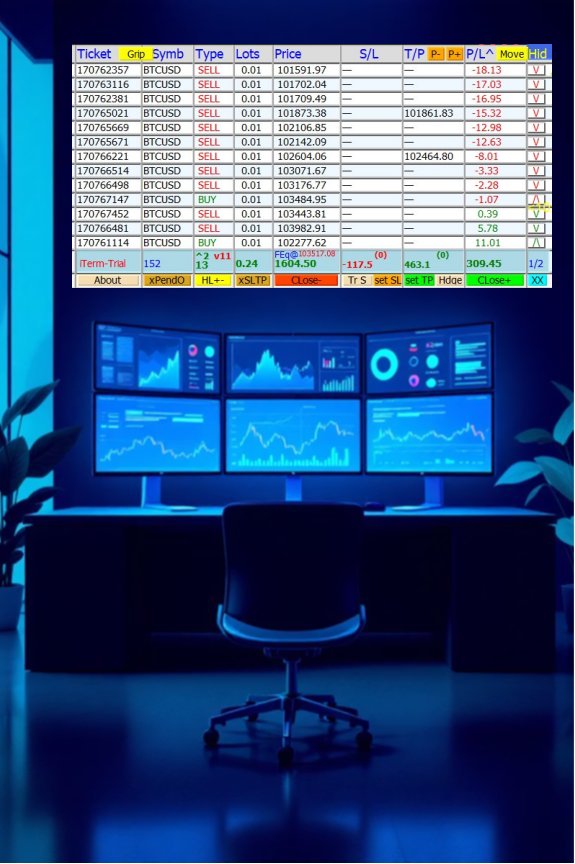
Trading workspace with FXL-iTerm

จุดเด่นเวลาใช้งานจริง Highlights in real trading

• เห็นภาพรวมพอร์ตทั้งหมดในมุมมองเดียว
• ใช้เส้น HLine ครอบช่วงราคา เพื่อสั่งปิดเฉพาะออเดอร์ที่อยู่ในโซนที่ต้องการ
• ทำงานร่วมกับ EA ตัวอื่นได้ เพราะ iTerm ไม่เข้าไปเปลี่ยน logic การเปิดออเดอร์ของ EA หลัก
• เหมาะมากสำหรับคนที่ชอบ Hedge, Grid หรือมีหลายไม้ในคู่เงินเดียวกัน
• View the whole portfolio in one clear interface
• Use HLines to cover price zones and close only orders inside that zone
• Works alongside your existing EA because iTerm does not touch its entry logic
• Great for hedge/grid styles or traders with many positions on the same symbol

ภาพซ้าย: บรรยากาศ workstation เทรดแบบ Multi-Monitor Left: Multi-monitor trading workstation atmosphere
ภาพบน Hero: สไตล์แบรนด์ FXLife และบรรยากาศการเทรด Hero image: FXLife brand style and trading mood

ดาวน์โหลด Download

ทดลองใช้งาน iTerm v1.0 (Trial) หรืออ่านคู่มือการใช้งานฉบับเต็ม Try iTerm v1.0 with the trial version or read the full user manual.

iTerm v1.0 (Trial Version) iTerm v1.0 (Trial Version)

ดาวน์โหลดไฟล์ .ex4 สำหรับติดตั้งบน MT4 (จำกัดเวลาใช้งาน 10 นาทีต่อรัน) Download the .ex4 file for MT4 (limited to 10 minutes per run in trial mode).

ดาวน์โหลด Trial (.zip) Download Trial (.zip)

คู่มือการใช้งาน (Manual) User Manual

ดาวน์โหลดคู่มือการติดตั้งและอธิบายฟีเจอร์ทั้งหมด (ไฟล์ .pdf) Download the full installation and feature manual (.pdf).

ดาวน์โหลดคู่มือ (.pdf) Download manual (.pdf)

แพ็กเกจ FXLife iTerm v1.0 FXLife iTerm v1.0 Plans

เลือกแพ็กเกจให้เหมาะกับรูปแบบการเทรดของคุณ – มีทั้งราคาโปรฯ สำหรับลูกค้าไทย
และราคาปกติ (USD) สำหรับลูกค้าต่างประเทศ
Choose a plan that fits your trading style – with special promo pricing for Thai traders
and standard USD pricing for international customers.

1 Year License 1 Year License
สิทธิ์ใช้งาน 1 ปีเต็ม 1-year access
฿599 จากปกติ ฿750 $19.9 from $24.9
• เหมาะสำหรับคนที่อยากลองใช้จริงในระยะยาว
• รวมอัปเดตฟรีตลอดอายุสัญญา 1 ปี
• ต่ออายุหรืออัปเกรดเป็น LifeTime ได้ภายหลัง
• Good if you want to test iTerm in real trading for a longer period
• Free updates for the full year
• Can renew or upgrade to LifeTime later
ราคาอ้างอิงต่างประเทศ ~$24.9 → โปรฯ ~$19.9 Reference price for international users: ~$24.9 → promo ~$19.9
สอบถามแพ็กเกจ 1 ปี Ask about 1-year plan
6 Months License 6 Months License
สิทธิ์ใช้งาน 6 เดือน 6-month access
฿449 จากปกติ ฿600 $14.9 from $19.9
• สำหรับคนที่อยากทดสอบการใช้งานจริงแบบกลาง ๆ
• เหมาะกับการรันคู่กับ EA หรือระบบเทรดหลายรูปแบบ
• สามารถอัปเกรดเป็น 1 ปี หรือ LifeTime ภายหลังได้
• A balanced option for mid-term testing
• Works well alongside various EAs or trading systems
• Upgradable to 1-year or LifeTime later
ราคาอ้างอิงต่างประเทศ ~$19.9 → โปรฯ ~$14.9 Reference international price: ~$19.9 → promo ~$14.9
สอบถามแพ็กเกจ 6 เดือน Ask about 6-month plan
3 Months License 3 Months License
สิทธิ์ใช้งาน 3 เดือน 3-month access
฿299 จากปกติ ฿450 $9.9 from $14.9
• เหมาะสำหรับผู้เริ่มต้นลองใช้ iTerm กับระบบเทรดปัจจุบัน
• ใช้ทดลอง workflow การจัดการพอร์ตจริง
• หากถูกใจสามารถต่ออายุหรืออัปเกรดได้ทุกเมื่อ
• Great entry-level plan to try iTerm with your current system
• Test how it fits into your real portfolio workflow
• Renew or upgrade anytime if you like it
ราคาอ้างอิงต่างประเทศ ~$14.9 → โปรฯ ~$9.9 Reference international price: ~$14.9 → promo ~$9.9
เริ่มต้นด้วยแพ็ก 3 เดือน Start with 3-month plan
มีโหมด Trial ให้ทดลองใช้งานระยะสั้น (ประมาณ 10 นาทีต่อรัน) และสามารถขอ FXL OTP เพื่อขยายเวลาทดสอบต่อครั้งได้ฟรี (ตามเงื่อนไขที่ผู้พัฒนากำหนด) A Trial mode is available (around 10 minutes per run). You can request an FXL OTP to extend each test session for free (under conditions defined by the developer).

คำถามพบบ่อย (FAQ) Frequently Asked Questions (FAQ)

ยังไม่แน่ใจว่าจะเหมาะกับสไตล์การเทรดของคุณไหม? ลองดูคำถาม–คำตอบเหล่านี้ก่อนได้ครับ Not sure if iTerm matches your trading style? These FAQs may help.

Q: FXL-iTerm เป็น EA ออโต้เทรดหรือเปล่า? Q: Is FXL-iTerm an auto-trading EA?
A: ไม่ใช่ EA ครับ iTerm เป็น Trading Tools / Intelligence Terminal เน้นช่วย “จัดการและควบคุมออเดอร์” เช่น ปิดไม้, ตั้ง SL/TP, ทดลองผลกระทบของราคาในอนาคต ฯลฯ โดยไม่ไปเปลี่ยน logic การเปิดออเดอร์ของระบบหลักคุณ A: No. iTerm is a Trading Tool / Intelligence Terminal, focusing on order management and control (closing orders, SL/TP management, what-if simulations, etc.) without changing the entry logic of your main system.
Q: ใช้กับ EA ตัวอื่นที่มีอยู่แล้วได้ไหม? Q: Can I use it with my existing EA?
A: ได้ครับ iTerm แยกหน้าที่กับ EA อื่น คุณจึงสามารถใช้ EA เปิดออเดอร์ตามระบบเดิมของคุณ และใช้ iTerm เป็น “หน้าจอควบคุมและจัดการพอร์ต” เพิ่มเติมได้ A: Yes. iTerm is independent from other EAs, so your EA can keep opening trades as usual, while iTerm acts as an additional control panel for managing the account.
Q: ต้องเปิด VPS ตลอดไหมถ้าใช้ iTerm? Q: Do I need a VPS to use iTerm?
A: ถ้าใช้โหมดช่วยจัดการออเดอร์ตอนที่คุณนั่งเฝ้าจอ ก็สามารถใช้กับ PC ปกติได้ แต่ถ้าคุณมี EA รัน 24 ชม. อยู่แล้ว แนะนำให้ใช้ VPS ตามปกติของ workflow การเทรดคุณ A: If you only use iTerm while you’re at the screen, a normal PC is enough. If you already run EAs 24/7, then keep using a VPS as part of your normal workflow.
Q: การขอ FXL OTP และ FXL Key ต้องทำอย่างไร? Q: How do I request an FXL OTP or FXL Key?
A: คุณเพียงใส่ Email และรายละเอียดบัญชีเทรด (เช่น Account Number, ชื่อ Server, ชื่อ Broker) ตามคำแนะนำในคู่มือ แล้วติดต่อผู้พัฒนาผ่าน Email หรือ Line เพื่อขอรหัส OTP หรือ Key ตามแพ็กเกจที่ต้องการ A: Simply provide your email and trading account details (account number, server name, broker) as shown in the manual, then contact the developer via Email or Line to request an OTP or license key according to your desired plan.

ติดต่อขอรายละเอียด / สั่งซื้อ FXL-iTerm Contact us for details / purchase FXL-iTerm

สนใจทดลองใช้ หรืออยากรู้ว่าเหมาะกับพอร์ตและสไตล์การเทรดของคุณแค่ไหน ทักมาคุยกันก่อนได้ Interested in a trial or want to know how it fits your style and account? Feel free to contact us first.

กรุณาระบุ: ชื่อเล่น / ช่องทางติดต่อ / โบรกเกอร์ที่ใช้ / ประเภทบัญชี (Standard / ECN) / แพ็กเกจที่สนใจ แล้วเราจะสรุปรายละเอียด + วิธีชำระเงินให้ครับ Please include: nickname, contact channel, broker, account type (Standard / ECN), and the plan you’re interested in. We will reply with full details and payment steps.

LineID: @206feasw
เพิ่มเพื่อน @206feasw หรือ prawitfx แล้วพิมพ์ว่า “สนใจ iTerm” Add friend (FXLife) and message “Interested in iTerm”.
Email: fxlife.asia@gmail.com
พิมพ์หัวเรื่อง Subject: "สนใจ iTerm" หรือ “iTerm License Key” หรือ "iTerm OTP" Use Subject: “Interested in iTerm”, “iTerm License Key” or “iTerm OTP”.
Facebook/Page: FXLife Facebook
อินบ็อกซ์มาพร้อมข้อมูลพอร์ตคร่าว ๆ ได้เลย Inbox us with a brief description of your account and style.
*เพื่อความรวดเร็วในการลงทะเบียน (ทั้งแบบฟรี OTP /หรือสมาชิก Key) ให้ส่งข้อมูลหมายเลขพอร์ต ชื่อเซิฟเวอร์ และโบรคเกอร์ ที่ต้องการใช้กับ iTerm มาให้ด้วยเลย ท่านจะได้รับการบริการที่ไวขึ้น *For faster registration (OTP or Key), please include your account number, server name and broker you want to use with iTerm. This helps us activate your license faster.